
Villages GPS
BK Partnerships, LLC.Maps & Navigation
4.2448.00 Reviews
- Version
- 9.4
- Installs
- 10.00K
- Age Rating
- Everyone
Screenshots
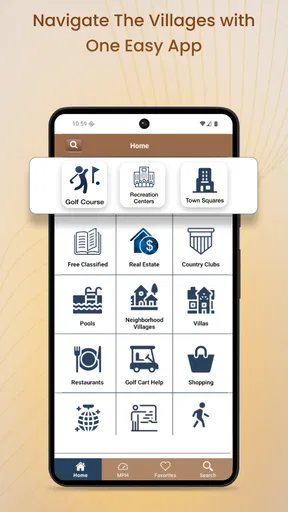
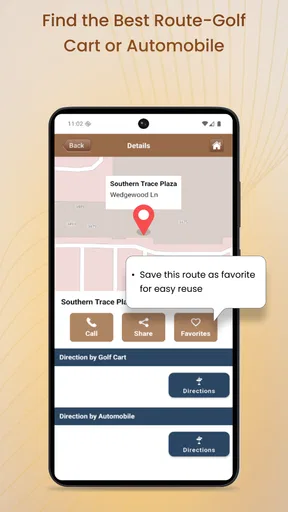
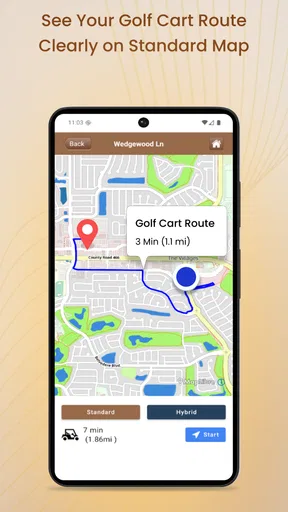
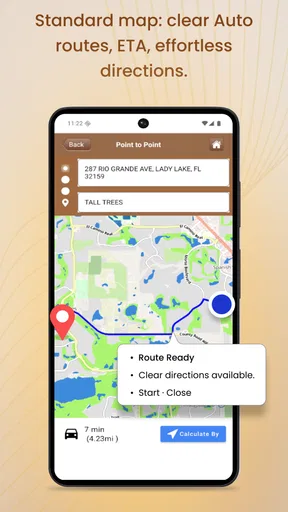
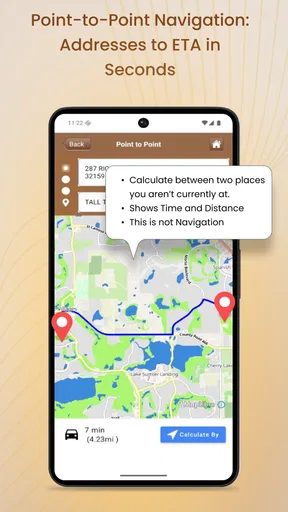
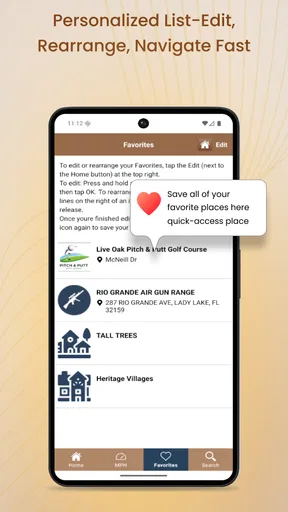
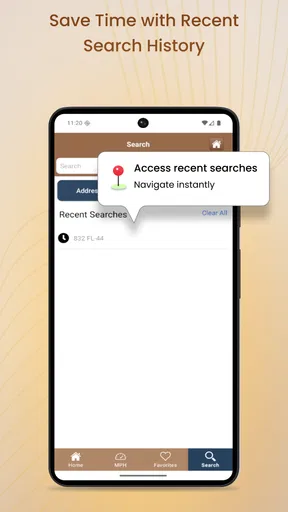
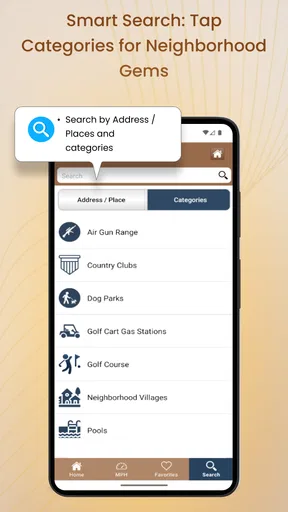
Our Review of Villages GPS
 Analysis by Appyee
For driving around The Villages, Florida, a navigation app is most useful when it understands the kind of trip you are actually making. Villages GPS focuses on voice directions for golf carts as well as vehicles, a distinction that can matter more than another general-purpose map feature. I like that its purpose is tied to a particular local routine: getting from one familiar stop to another without having to keep looking down at a screen. It is a free navigation app from BK Partnerships, LLC., and its narrow focus is both its clearest strength and the first thing I would consider before installing it.
Why golf-cart voice guidance changes the trip
Most people already have a map app on their phone, so the question is not whether a map can draw a route. It is whether the directions suit the vehicle and the place. When I am driving a golf cart, following a route intended for an ordinary car may not be the right experience. Villages GPS is built around the local golf-cart-and-vehicle use case, making voice navigation its central appeal rather than a minor option buried in a broader travel app.
Voice guidance is especially practical when you are moving through a sequence of turns and would rather keep your attention on the road than repeatedly glance at a phone. That does not make the app a substitute for paying attention: I would still check the route before setting off and follow signs and local rules. But spoken directions can make a familiar errand feel less fussy, particularly when the passenger is not acting as a navigator.
A practical way to use it around town
I would treat the app as a route companion for a specific outing, not as something to explore while moving. Before leaving, enter the destination while safely parked, confirm that it is the place you intend to reach, and set the phone where directions are easy to hear without obstructing your view. Then let the voice prompts handle the routine reminders while you concentrate on driving. If a turn or instruction seems inconsistent with what is in front of you, trust the actual road conditions and choose a safe place to reassess.
That simple workflow is useful for everyday trips as much as for visitors finding their way around. A resident heading to a regular appointment can reduce the need to remember every turn; someone who has just arrived can focus on getting oriented rather than trying to interpret a map in motion. I would also ask a passenger to help with destination entry or route checks when needed. It is an easy way to avoid turning a navigation tool into a distraction.
Who will get the most from this focus
The strongest fit is someone who regularly drives a golf cart in The Villages, or a visitor who expects to make several trips there and wants voice-led directions suited to that setting. The app is also worth considering if you drive a vehicle locally and prefer a dedicated tool for getting around the community. Its average rating is 4.4 from over 500 ratings, and it has passed 10,000 installs, suggesting that it has found an audience among people looking for this particular kind of guidance.
If you mainly need broad navigation across many cities, a conventional maps app is likely the more sensible default. Those tools are designed for general travel and can be more convenient when your day includes places far beyond this community. I would not install Villages GPS expecting it to replace every mapping need on a phone. Its value depends on whether its local, golf-cart-centered purpose matches how you travel.
Trade-offs to consider before relying on it
A specialized navigation app asks you to make a practical choice: use a tool aimed at a specific area and type of trip, or stick with a familiar general-purpose service. Specialization can make the app feel more relevant when you are driving a golf cart locally, but it also means the fit is narrower. If your plans change to a trip elsewhere, you may want another navigation option ready rather than assuming this one will serve every destination equally well.
I would also make a short, low-pressure test run before depending on it for an important appointment. That gives you time to get comfortable with the voice directions and see whether the experience suits your phone, vehicle and listening preferences. Keep the device secure, set directions before moving, and avoid fiddling with the screen at junctions. These habits are useful with any navigation app, but they matter especially when the point of voice guidance is to reduce screen handling.
Getting Started with Villages GPS
First off, downloading Villages GPS is a breeze. Available for both Android and iOS, you can find it on the Google Play Store and the Apple App Store. Once installed, the interface is welcoming and straightforward. No need to wrestle with complicated settings or over-the-top features. It's all about simplicity and efficiency here. As soon as you open the app, you're greeted with a clean map interface. It’s intuitive enough that even your tech-challenged relatives could navigate it without a hitch.
Features That Stand Out
One of the stellar features of this app is its offline map capability. How often have you found yourself in a signal dead zone just when you need directions the most? With Villages GPS, you can download maps for offline use, ensuring you're never left in the lurch. This is particularly useful in remote areas where cell service might be spotty.
Another highlight is the app's extensive database of points of interest. Whether you’re looking for the nearest gas station, a quaint bed and breakfast, or a hidden hiking trail, this app has got you covered. It's like having a local's insight without having to ask anyone for directions.
Ease of Use and Navigation
Navigation in Villages GPS is seamless. The voice-guided directions are clear and precise, making it easy to follow even in areas with complex road networks. And the best part? You can choose between different voices, so you can be guided by the calm tones of a friendly voice or the authoritative instructions of a professional guide. Talk about personalizing your journey!
The app also provides real-time traffic updates, which is a lifesaver when you're trying to avoid those pesky rural traffic jams—or in this case, the occasional tractor parade!
Why It's Worth Downloading
If you're someone who loves exploring off-the-beaten-path destinations, this app is a game-changer. It’s not just about getting you from point A to B; it’s about enhancing your travel experience. With the ability to save favorite locations and routes, you can easily plan your trips ahead of time and ensure you don't miss out on any hidden gems along the way.
And let's not forget the app's community-driven updates. Users can contribute information about new roads or closed routes, making it a dynamic tool that keeps improving with each update.
What to expect as a new user
Villages GPS is rated for Everyone, and the current version is 8.6, with a minimum OS requirement of 7.1. Those details make it easier to judge whether an older device is likely to meet the basic platform requirement before you plan around the app. I would still install it and try a short local journey before treating it as essential, especially if you are setting it up for someone who is not comfortable changing phone settings.
The app is free to download, with in-app purchases listed at $8.99 per item. That makes the initial decision straightforward: you can try the basic experience without paying an upfront price, then decide whether anything offered inside is relevant to you. I would not assume a purchase is necessary for ordinary navigation; first see how the version you install handles the routes you actually take.
Choosing it over a general map
For a trip that stays within The Villages and involves a golf cart, the dedicated focus is the reason to give this app a look. A general map is usually more convenient for a mixed itinerary—say, driving across Florida, finding a business in another city, and then continuing on a highway—because it is intended to cover a wider range of journeys. The trade-off is simple: Villages GPS may be the more relevant tool for its local purpose, while a mainstream alternative is the safer all-round choice when your route goes beyond it.
I would not use the app simply because it has “GPS” in its name if what you need is a complete travel planner, a broad directory, or a dependable choice for every road trip. Instead, compare the task: if you want spoken guidance while navigating locally by golf cart or vehicle, its specialization makes sense; if you want one map app for an unpredictable day across different places, use the broader service you already trust.
A realistic outing, from setup to arrival
Imagine a visitor staying in The Villages who needs to reach a planned lunch stop in a golf cart, then return later by vehicle. I would enter the first destination while parked, listen for the prompts on the way, and avoid changing the route while crossing or approaching a junction. On the return trip, I would set the next destination only after stopping safely. The useful detail is not complicated route planning; it is reducing the small moments of uncertainty that can make an unfamiliar local trip stressful.
For a resident, the same approach can help with an occasional destination that is not part of the daily routine. Before setting off, it is worth checking that the destination pin or name matches the intended place, especially if several locations have similar names. That quick check is more valuable than trying to correct a wrong destination once you are already moving.
Small habits that make navigation more dependable
I recommend treating spoken instructions as prompts, not commands. Listen early, look for road signs, and make a turn only when it is safe and permitted. If a direction arrives at an awkward moment, continue safely and reassess when stopped rather than trying to recover the route with the phone in hand. A passenger can handle destination changes, but the driver should keep attention on the road.
It is also sensible to think about sound before departure. A voice prompt is only helpful if it can be heard clearly over the conditions in the vehicle, so I would test the volume while parked instead of discovering a problem during a turn. Keep the phone positioned securely and within easy view without blocking the road. These are modest steps, but they make the app’s main benefit—hands-free guidance—more useful in practice.
Where I would be cautious
Even a locally focused navigation app cannot remove the need to judge the route yourself. Roads can change, a destination can be entered incorrectly, and a spoken instruction may not match what you see at a particular moment. I would therefore avoid making it the sole basis for a time-critical trip until I had tried it on a route I already knew. That is not a reason to avoid the app; it is a sensible way to learn how its directions fit your habits.
The other limitation is scope. If you only visit The Villages once, or already navigate comfortably with a general map, installing another app may add little value. Likewise, frequent travelers who need one consistent tool across many regions may prefer a broad navigation service. The dedicated approach is most persuasive when the local golf-cart use case comes up often enough to justify having a separate option.
My recommendation for the right kind of trip
With 431 reviews and a free starting point, the app has attracted attention from people looking for local guidance, but the decision should come down to your own route rather than popularity. I would recommend trying it if you drive a golf cart or vehicle around The Villages and want spoken directions tailored to that setting. I would skip it if your needs are mostly long-distance navigation, general travel discovery, or a single short visit for which your existing map app already feels clear.
Before relying on it regularly, take one familiar trip and one slightly less familiar trip, both without time pressure. Notice whether the instructions arrive at useful moments and whether the app’s local focus fits your vehicle and destinations. That small test gives you a practical answer about its value without requiring you to reorganize your whole navigation routine.
Wrapping It Up
In a world dominated by mainstream navigation apps, Villages GPS offers a refreshing alternative for those seeking more than just the fastest route. It's about the journey, not just the destination. Whether you're a weekend wanderer or a seasoned explorer, this app provides the tools you need to make the most of your adventures. So, next time you're planning a trip to the countryside, make sure this app is loaded on your phone. You’ll be glad you did!
And there you have it, folks. A trusty companion for your rural explorations, ensuring that getting lost is a thing of the past—unless, of course, you want to, in which case, just turn off the app and get wonderfully lost!
Verdict
Strengths of Villages GPS
- Accurate real-time navigation updates.
- User-friendly interface with easy controls.
- Offline maps available for rural areas.
- Customizable route planning options.
- Detailed POI information included.
Limitations of Villages GPS
- Limited support for public transport routes.
- Ads can be intrusive at times.
- Battery consumption is relatively high.
- Some features require a premium upgrade.
- Occasional map loading delays.
Similar Picks in This Category
View All
Uber - Request a ride
Uber Technologies, Inc.4.7


inDrive. Rides with fair fares
® SUOL INNOVATIONS LTD4.8

Yandex Go: Taxi Food Delivery
Mikromobilnost LLC Belgrade4.8

Bolt: Request a Ride
Bolt Technology4.8

Rapido: Bike-Taxi, Auto & Cabs
Rapido Bike Taxi4.8
Frequently Asked Questions
What is Villages GPS and how does it work?
Villages GPS is a navigation app specifically designed for residents and visitors of The Villages, Florida. It provides accurate, real-time GPS directions, points of interest, and community-specific features like golf cart paths. The app uses your device’s GPS to offer turn-by-turn directions, ensuring you can easily navigate this sprawling community.
Is Villages GPS available for both Android and iOS devices?
Yes, Villages GPS is available for download on both Android and iOS platforms. Users can access the app from the Google Play Store and the Apple App Store, ensuring availability for a wide range of smartphones and tablets. Regular updates ensure compatibility with the latest operating systems.
Does Villages GPS require an internet connection to function?
While Villages GPS uses your device's GPS for navigation, certain features, like real-time updates and map downloads, require an internet connection. However, once maps are cached, you can access basic navigation without a constant internet connection, making it useful even in areas with limited connectivity.
What are the main features of Villages GPS?
Villages GPS offers several features tailored for The Villages community, including golf cart path navigation, detailed street maps, and points of interest such as restaurants, medical facilities, and recreation centers. The app also includes voice-guided directions and regular updates to reflect the latest community developments.
How user-friendly is Villages GPS for first-time users?
Villages GPS is designed with user-friendliness in mind, featuring a simple, intuitive interface. First-time users will find it easy to input destinations and navigate the community. The app provides helpful prompts and clear instructions, ensuring even those new to smartphone navigation can use it effectively.
